Designing for the Unknown:
Designing for the Unknown:
Designing for the Unknown:
Is AI Prototyping Making It Harder to Get Anything Done?
Is AI Prototyping Making It Harder to Get Anything Done?
Is AI Prototyping Making It Harder to Get Anything Done?
AI prototyping tools have changed the pace of design and development work. What once required time, coordination, and tradeoffs can now be produced almost instantly, often by anyone on the team. That shift has brought real advantages, but it has also changed how teams move from exploration to execution, sometimes in ways that aren’t obvious until progress starts to slip.
Articles
·
5 min
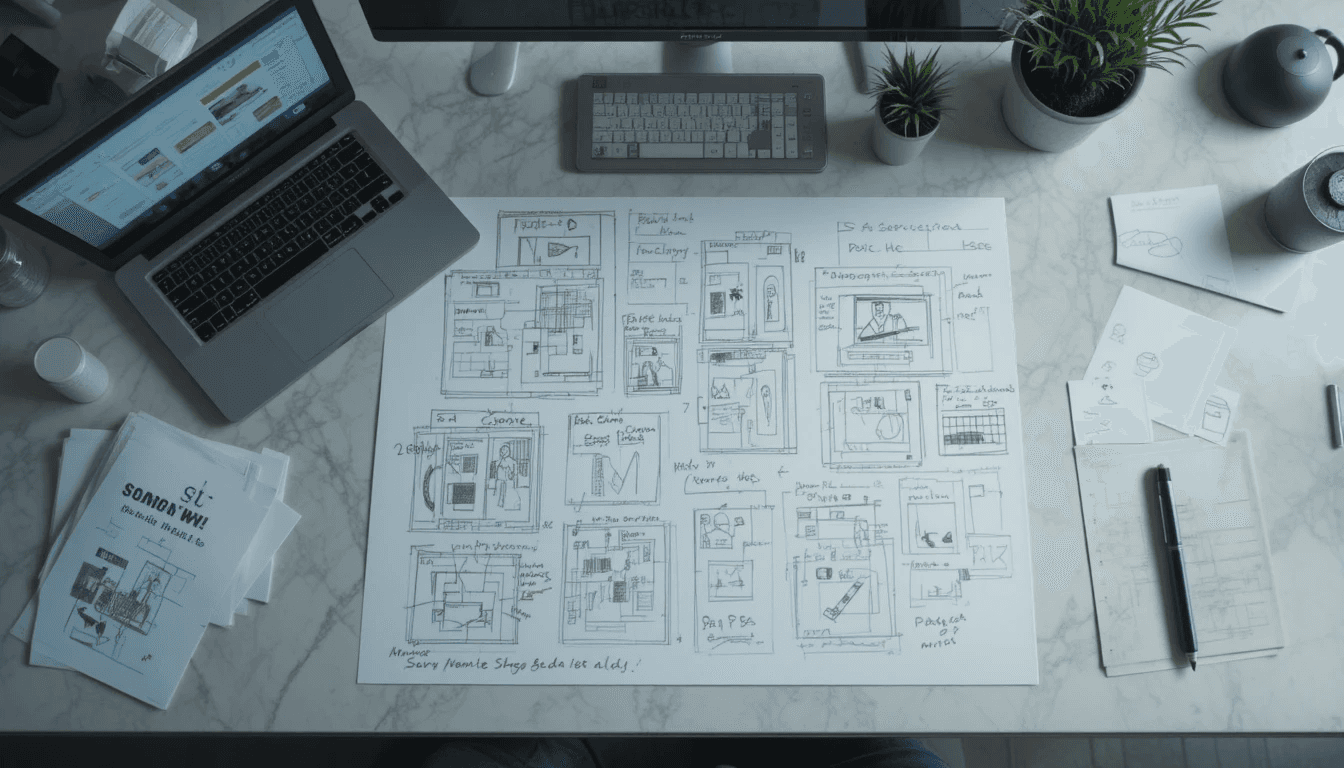
Lately, I’ve been noticing a pattern across teams using AI prototyping tools. It usually starts with momentum and good intent.
A prototype gets reviewed, the team engages, feedback is thoughtful, and tradeoffs are surfaced. Then, instead of refining what’s already on the table, a new version shows up the next day, generated from scratch. It addresses a few of the issues that came up, introduces new ones, and quietly invalidates part of the previous conversation without anyone explicitly deciding to do so.
Nothing is obviously wrong, but the work doesn’t quite move forward either. Over time, it begins to feel like the team is restarting the same discussion each day, busy and engaged, yet never stabilizing on something solid enough to carry into execution.
When prototypes carried weight
Not that long ago, and by “not that long ago” I mean before things shifted almost overnight, creating a prototype took more effort. That effort had an important side effect: it slowed teams down just enough to make alignment visible.
A prototype wasn’t only a visual artifact. It carried context, reflected agreed constraints, and held decisions in place long enough for people to react, disagree, and eventually build on what was there. The friction wasn’t accidental. It made it harder to casually discard work and easier to treat a prototype as a shared reference rather than a disposable output.
The AI tools we have now remove most of that friction. Generating a new artifact is easy, almost effortless, but carrying decisions forward is still hard. When the artifact keeps changing, feedback doesn’t compound in the way teams expect. Conversations repeat, people stop assuming their input will survive, and what looks like steady motion gradually loses any sense of direction.
The work continues, but it doesn’t accumulate.
A lesson teams used to learn naturally
This isn’t a new problem. Many product teams learned some version of this lesson long before AI entered the picture.
As designers, most of us eventually realized that bringing a completely new solution to every design review, even when the idea was strong, didn’t help teams decide. It reset the conversation and pushed execution further out. Progress came from working within what had already been established, understanding the constraints in play, and refining the approach over time, with the judgment to recognize when a reset was actually worth the cost.
That instinct hasn’t disappeared, but the environment has changed. AI tools make restarting so easy that teams can fall into the habit without noticing what it’s doing to their ability to converge.
This isn’t about AI-generated prototypes being worse than human ones. No prototype has ever captured every business requirement, technical limitation, or stakeholder concern. The difference has always been knowing when a prototype is meant to explore and when it’s meant to converge. Right now, the tools heavily bias teams toward exploration, even at moments when decisions need to hold.
Structure before screens
There’s another shift underneath this behavior that’s easier to miss.
Good designers and design teams rarely tried to solve an entire experience in one pass. Instead, they often came to the table with a deliberately scoped slice of the problem, something narrow enough to reason about but concrete enough to move the work forward. In complex spaces, that usually meant creating structure before creating screens.
The goal wasn’t to present a finished solution. It was to give the team a shared way of thinking about the problem. When that shared structure existed, discussions had something to anchor to. People reacted to the same underlying model rather than just surface-level UI, and decisions had a place to live even as the details evolved.
What I see now is that AI tools make teams skip this step. They generate full experiences that look mostly right on first pass. The structure feels familiar. The language sounds plausible. It’s easy to assume the hard thinking has already happened. But once someone really digs in, the gaps start to show. Important distinctions are missing, concepts that should be separated are blended together, and the apparent completeness of the prototype never quite translates into shared understanding.
That’s when decisions start to loosen, and the work quietly resets.
It’s not a question of who should prototype, it’s when
The issue here isn’t access to AI tools. It’s timing.
Early on, loose prototyping is exactly what teams need. Broad exploration surfaces insights. Parallel directions are useful. Throwing work away is expected. AI tools are genuinely valuable in this phase because speed matters more than coherence and range matters more than continuity.
As teams move toward a decision, though, the rules need to change. At some point, there has to be a shared artifact that carries decisions forward. New ideas don’t disappear, but they show up differently. Instead of replacing the work, they refine it. Instead of reopening the problem, they improve the solution that’s already in progress.
Once execution begins, stability becomes intentional. Prototypes exist to support delivery rather than to keep redefining direction. AI can still help here, but in targeted ways that don’t reset the work every time they’re used.
How I’ve been trying to keep this from breaking down
I don’t have a perfect answer to this, but in my own team the only thing that’s consistently helped is being explicit about when the rules change.
At the start, we keep things deliberately loose. During discovery and early ideation, everyone can prototype. We share everything. Speed matters more than coherence, and throwing work away is part of the deal. At that stage, a prototype is simply a thinking aid.
Then we slow down on purpose.
Before anything gets built out further, we pause and align with stakeholders, not to polish the work, but to write down what we’re actually committing to. The value proposition we’re optimizing for. The constraints we’re accepting. The assumptions we’re making and the ones we’re explicitly ruling out.
That shared story becomes the reference point.
Once that’s in place, we stop multiplying artifacts. From there on, there is one prototype, and new ideas don’t show up as replacements, but as edits, annotations, and changes to the shared work.
AI tools don’t disappear at this point, but they’re used differently. Instead of generating an entirely new experience, they help articulate a specific improvement, explore a small variation, or clarify how a change might work within what’s already been decided.
Collaboration shifts from asking what else we could try to asking how this improves what’s already there. Feedback becomes cumulative instead of repetitive, and decisions start to stick. The work may feel less exciting than generating a shiny new interface, but what’s getting done starts to feel real.
What these tools are really revealing
When AI tools make generating a new prototype easier than staying with the current one, teams need an explicit moment where they agree to stop exploring and start committing. Without that moment, everything stays provisional, even when it looks finished.
Once friction disappears, progress depends less on speed and more on judgment: the ability to choose a direction, carry decisions forward, and resist the pull to reset the work just because starting over is cheap.
Lately, I’ve been noticing a pattern across teams using AI prototyping tools. It usually starts with momentum and good intent.
A prototype gets reviewed, the team engages, feedback is thoughtful, and tradeoffs are surfaced. Then, instead of refining what’s already on the table, a new version shows up the next day, generated from scratch. It addresses a few of the issues that came up, introduces new ones, and quietly invalidates part of the previous conversation without anyone explicitly deciding to do so.
Nothing is obviously wrong, but the work doesn’t quite move forward either. Over time, it begins to feel like the team is restarting the same discussion each day, busy and engaged, yet never stabilizing on something solid enough to carry into execution.
When prototypes carried weight
Not that long ago, and by “not that long ago” I mean before things shifted almost overnight, creating a prototype took more effort. That effort had an important side effect: it slowed teams down just enough to make alignment visible.
A prototype wasn’t only a visual artifact. It carried context, reflected agreed constraints, and held decisions in place long enough for people to react, disagree, and eventually build on what was there. The friction wasn’t accidental. It made it harder to casually discard work and easier to treat a prototype as a shared reference rather than a disposable output.
The AI tools we have now remove most of that friction. Generating a new artifact is easy, almost effortless, but carrying decisions forward is still hard. When the artifact keeps changing, feedback doesn’t compound in the way teams expect. Conversations repeat, people stop assuming their input will survive, and what looks like steady motion gradually loses any sense of direction.
The work continues, but it doesn’t accumulate.
A lesson teams used to learn naturally
This isn’t a new problem. Many product teams learned some version of this lesson long before AI entered the picture.
As designers, most of us eventually realized that bringing a completely new solution to every design review, even when the idea was strong, didn’t help teams decide. It reset the conversation and pushed execution further out. Progress came from working within what had already been established, understanding the constraints in play, and refining the approach over time, with the judgment to recognize when a reset was actually worth the cost.
That instinct hasn’t disappeared, but the environment has changed. AI tools make restarting so easy that teams can fall into the habit without noticing what it’s doing to their ability to converge.
This isn’t about AI-generated prototypes being worse than human ones. No prototype has ever captured every business requirement, technical limitation, or stakeholder concern. The difference has always been knowing when a prototype is meant to explore and when it’s meant to converge. Right now, the tools heavily bias teams toward exploration, even at moments when decisions need to hold.
Structure before screens
There’s another shift underneath this behavior that’s easier to miss.
Good designers and design teams rarely tried to solve an entire experience in one pass. Instead, they often came to the table with a deliberately scoped slice of the problem, something narrow enough to reason about but concrete enough to move the work forward. In complex spaces, that usually meant creating structure before creating screens.
The goal wasn’t to present a finished solution. It was to give the team a shared way of thinking about the problem. When that shared structure existed, discussions had something to anchor to. People reacted to the same underlying model rather than just surface-level UI, and decisions had a place to live even as the details evolved.
What I see now is that AI tools make teams skip this step. They generate full experiences that look mostly right on first pass. The structure feels familiar. The language sounds plausible. It’s easy to assume the hard thinking has already happened. But once someone really digs in, the gaps start to show. Important distinctions are missing, concepts that should be separated are blended together, and the apparent completeness of the prototype never quite translates into shared understanding.
That’s when decisions start to loosen, and the work quietly resets.
It’s not a question of who should prototype, it’s when
The issue here isn’t access to AI tools. It’s timing.
Early on, loose prototyping is exactly what teams need. Broad exploration surfaces insights. Parallel directions are useful. Throwing work away is expected. AI tools are genuinely valuable in this phase because speed matters more than coherence and range matters more than continuity.
As teams move toward a decision, though, the rules need to change. At some point, there has to be a shared artifact that carries decisions forward. New ideas don’t disappear, but they show up differently. Instead of replacing the work, they refine it. Instead of reopening the problem, they improve the solution that’s already in progress.
Once execution begins, stability becomes intentional. Prototypes exist to support delivery rather than to keep redefining direction. AI can still help here, but in targeted ways that don’t reset the work every time they’re used.
How I’ve been trying to keep this from breaking down
I don’t have a perfect answer to this, but in my own team the only thing that’s consistently helped is being explicit about when the rules change.
At the start, we keep things deliberately loose. During discovery and early ideation, everyone can prototype. We share everything. Speed matters more than coherence, and throwing work away is part of the deal. At that stage, a prototype is simply a thinking aid.
Then we slow down on purpose.
Before anything gets built out further, we pause and align with stakeholders, not to polish the work, but to write down what we’re actually committing to. The value proposition we’re optimizing for. The constraints we’re accepting. The assumptions we’re making and the ones we’re explicitly ruling out.
That shared story becomes the reference point.
Once that’s in place, we stop multiplying artifacts. From there on, there is one prototype, and new ideas don’t show up as replacements, but as edits, annotations, and changes to the shared work.
AI tools don’t disappear at this point, but they’re used differently. Instead of generating an entirely new experience, they help articulate a specific improvement, explore a small variation, or clarify how a change might work within what’s already been decided.
Collaboration shifts from asking what else we could try to asking how this improves what’s already there. Feedback becomes cumulative instead of repetitive, and decisions start to stick. The work may feel less exciting than generating a shiny new interface, but what’s getting done starts to feel real.
What these tools are really revealing
When AI tools make generating a new prototype easier than staying with the current one, teams need an explicit moment where they agree to stop exploring and start committing. Without that moment, everything stays provisional, even when it looks finished.
Once friction disappears, progress depends less on speed and more on judgment: the ability to choose a direction, carry decisions forward, and resist the pull to reset the work just because starting over is cheap.
Lately, I’ve been noticing a pattern across teams using AI prototyping tools. It usually starts with momentum and good intent.
A prototype gets reviewed, the team engages, feedback is thoughtful, and tradeoffs are surfaced. Then, instead of refining what’s already on the table, a new version shows up the next day, generated from scratch. It addresses a few of the issues that came up, introduces new ones, and quietly invalidates part of the previous conversation without anyone explicitly deciding to do so.
Nothing is obviously wrong, but the work doesn’t quite move forward either. Over time, it begins to feel like the team is restarting the same discussion each day, busy and engaged, yet never stabilizing on something solid enough to carry into execution.
When prototypes carried weight
Not that long ago, and by “not that long ago” I mean before things shifted almost overnight, creating a prototype took more effort. That effort had an important side effect: it slowed teams down just enough to make alignment visible.
A prototype wasn’t only a visual artifact. It carried context, reflected agreed constraints, and held decisions in place long enough for people to react, disagree, and eventually build on what was there. The friction wasn’t accidental. It made it harder to casually discard work and easier to treat a prototype as a shared reference rather than a disposable output.
The AI tools we have now remove most of that friction. Generating a new artifact is easy, almost effortless, but carrying decisions forward is still hard. When the artifact keeps changing, feedback doesn’t compound in the way teams expect. Conversations repeat, people stop assuming their input will survive, and what looks like steady motion gradually loses any sense of direction.
The work continues, but it doesn’t accumulate.
A lesson teams used to learn naturally
This isn’t a new problem. Many product teams learned some version of this lesson long before AI entered the picture.
As designers, most of us eventually realized that bringing a completely new solution to every design review, even when the idea was strong, didn’t help teams decide. It reset the conversation and pushed execution further out. Progress came from working within what had already been established, understanding the constraints in play, and refining the approach over time, with the judgment to recognize when a reset was actually worth the cost.
That instinct hasn’t disappeared, but the environment has changed. AI tools make restarting so easy that teams can fall into the habit without noticing what it’s doing to their ability to converge.
This isn’t about AI-generated prototypes being worse than human ones. No prototype has ever captured every business requirement, technical limitation, or stakeholder concern. The difference has always been knowing when a prototype is meant to explore and when it’s meant to converge. Right now, the tools heavily bias teams toward exploration, even at moments when decisions need to hold.
Structure before screens
There’s another shift underneath this behavior that’s easier to miss.
Good designers and design teams rarely tried to solve an entire experience in one pass. Instead, they often came to the table with a deliberately scoped slice of the problem, something narrow enough to reason about but concrete enough to move the work forward. In complex spaces, that usually meant creating structure before creating screens.
The goal wasn’t to present a finished solution. It was to give the team a shared way of thinking about the problem. When that shared structure existed, discussions had something to anchor to. People reacted to the same underlying model rather than just surface-level UI, and decisions had a place to live even as the details evolved.
What I see now is that AI tools make teams skip this step. They generate full experiences that look mostly right on first pass. The structure feels familiar. The language sounds plausible. It’s easy to assume the hard thinking has already happened. But once someone really digs in, the gaps start to show. Important distinctions are missing, concepts that should be separated are blended together, and the apparent completeness of the prototype never quite translates into shared understanding.
That’s when decisions start to loosen, and the work quietly resets.
It’s not a question of who should prototype, it’s when
The issue here isn’t access to AI tools. It’s timing.
Early on, loose prototyping is exactly what teams need. Broad exploration surfaces insights. Parallel directions are useful. Throwing work away is expected. AI tools are genuinely valuable in this phase because speed matters more than coherence and range matters more than continuity.
As teams move toward a decision, though, the rules need to change. At some point, there has to be a shared artifact that carries decisions forward. New ideas don’t disappear, but they show up differently. Instead of replacing the work, they refine it. Instead of reopening the problem, they improve the solution that’s already in progress.
Once execution begins, stability becomes intentional. Prototypes exist to support delivery rather than to keep redefining direction. AI can still help here, but in targeted ways that don’t reset the work every time they’re used.
How I’ve been trying to keep this from breaking down
I don’t have a perfect answer to this, but in my own team the only thing that’s consistently helped is being explicit about when the rules change.
At the start, we keep things deliberately loose. During discovery and early ideation, everyone can prototype. We share everything. Speed matters more than coherence, and throwing work away is part of the deal. At that stage, a prototype is simply a thinking aid.
Then we slow down on purpose.
Before anything gets built out further, we pause and align with stakeholders, not to polish the work, but to write down what we’re actually committing to. The value proposition we’re optimizing for. The constraints we’re accepting. The assumptions we’re making and the ones we’re explicitly ruling out.
That shared story becomes the reference point.
Once that’s in place, we stop multiplying artifacts. From there on, there is one prototype, and new ideas don’t show up as replacements, but as edits, annotations, and changes to the shared work.
AI tools don’t disappear at this point, but they’re used differently. Instead of generating an entirely new experience, they help articulate a specific improvement, explore a small variation, or clarify how a change might work within what’s already been decided.
Collaboration shifts from asking what else we could try to asking how this improves what’s already there. Feedback becomes cumulative instead of repetitive, and decisions start to stick. The work may feel less exciting than generating a shiny new interface, but what’s getting done starts to feel real.
What these tools are really revealing
When AI tools make generating a new prototype easier than staying with the current one, teams need an explicit moment where they agree to stop exploring and start committing. Without that moment, everything stays provisional, even when it looks finished.
Once friction disappears, progress depends less on speed and more on judgment: the ability to choose a direction, carry decisions forward, and resist the pull to reset the work just because starting over is cheap.
So, that gives us a world where AI agents can discover and authenticate one another, share complex information securely, and adapt to uncertainty while collaborating across different domains. And users will be working with agents that will pursue complex goals with limited direct supervision, acting autonomously on behalf of them.
As a design team, we are actively shaping how we navigate this transformation. And one key question keeps emerging: How do we design AI experiences that empower human-machine teams, rather than just automate them?
The Agentic Teammate: Enhancing Knowledge Work
In this new world, AI agents become our teammates, offering powerful capabilities:
Knowledge Synthesis: Agents aggregate and analyze data from multiple sources, offering fresh perspectives on problems.
Scenario Simulation: Agents can create hypothetical scenarios and test them in a virtual environment, allowing knowledge workers to experiment and assess risks.
Constructive Feedback: Agents critically evaluate human-proposed solutions, identifying flaws and offering constructive feedback.
Collaboration Orchestration: Agents work with other agents to tackle complex problems, acting as orchestrators of a broader agentic ecosystem.
So, that gives us a world where AI agents can discover and authenticate one another, share complex information securely, and adapt to uncertainty while collaborating across different domains. And users will be working with agents that will pursue complex goals with limited direct supervision, acting autonomously on behalf of them.
As a design team, we are actively shaping how we navigate this transformation. And one key question keeps emerging: How do we design AI experiences that empower human-machine teams, rather than just automate them?
The Agentic Teammate: Enhancing Knowledge Work
In this new world, AI agents become our teammates, offering powerful capabilities:
Knowledge Synthesis: Agents aggregate and analyze data from multiple sources, offering fresh perspectives on problems.
Scenario Simulation: Agents can create hypothetical scenarios and test them in a virtual environment, allowing knowledge workers to experiment and assess risks.
Constructive Feedback: Agents critically evaluate human-proposed solutions, identifying flaws and offering constructive feedback.
Collaboration Orchestration: Agents work with other agents to tackle complex problems, acting as orchestrators of a broader agentic ecosystem.
Addressing the Challenges: Gaps in Human-Agent Collaboration
All this autonomous help is great, sure – but it's not without its challenges.
Autonomous agents have fundamental gaps that we need to address to ensure successful collaboration:
So, that gives us a world where AI agents can discover and authenticate one another, share complex information securely, and adapt to uncertainty while collaborating across different domains. And users will be working with agents that will pursue complex goals with limited direct supervision, acting autonomously on behalf of them.
As a design team, we are actively shaping how we navigate this transformation. And one key question keeps emerging: How do we design AI experiences that empower human-machine teams, rather than just automate them?
The Agentic Teammate: Enhancing Knowledge Work
In this new world, AI agents become our teammates, offering powerful capabilities:
Knowledge Synthesis: Agents aggregate and analyze data from multiple sources, offering fresh perspectives on problems.
Scenario Simulation: Agents can create hypothetical scenarios and test them in a virtual environment, allowing knowledge workers to experiment and assess risks.
Constructive Feedback: Agents critically evaluate human-proposed solutions, identifying flaws and offering constructive feedback.
Collaboration Orchestration: Agents work with other agents to tackle complex problems, acting as orchestrators of a broader agentic ecosystem.

Probabilistic Operations
AI agents work with probabilities, leading to inconsistent outcomes and misinterpretations of intent.
Trust Over Time
Humans tend to trust AI teammates less than human teammates, making it crucial to build that trust over time.
Gaps in Contextual Understanding
AI agents often share raw data instead of contextual states, and may miss human nuances like team dynamics and intuition.
Challenges in Mental Models
Evolving AI systems can be difficult for humans to understand and keep up with, as the AI's logic may not align with human mental models.
The Solution:
Five Design Principles for Human-Agent Collaboration
Put Humans in the Driver's Seat
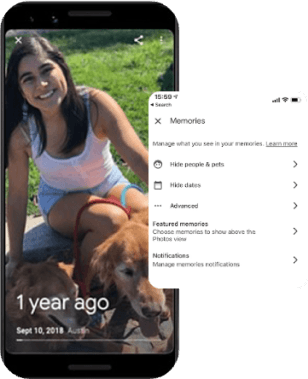
Users should always have the final say, with clear boundaries and intuitive controls to adjust agent behavior. An example of this is Google Photos' Memories feature which allows users to customize their slideshows and turn the feature off completely.
Make the Invisible Visible
The AI's reasoning and decision-making processes should be transparent and easy to understand, with confidence levels or uncertainty displayed to set realistic expectations. North Face's AI shopping assistant exemplifies this by guiding users through a conversational process and providing clear recommendations.

Ensure Accountability
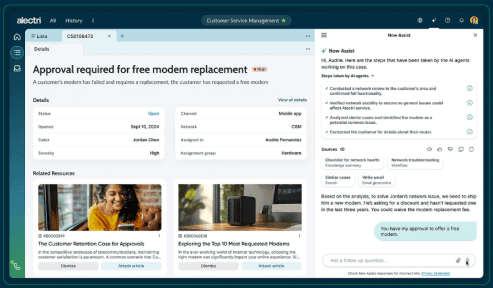
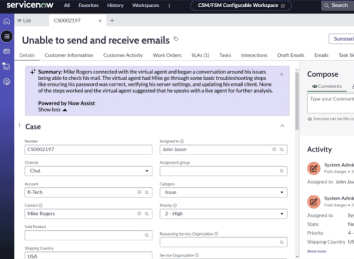
Anticipate edge cases to provide clear recovery steps, while empowering users to verify and adjust AI outcomes when needed. ServiceNow's Now Assist AI is designed to allow customer support staff to easily verify and adjust AI-generated insights and recommendations.
Collaborate, Don't Just Automate
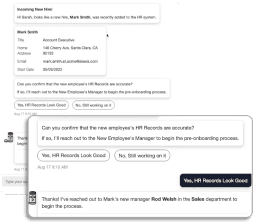
Prioritize workflows that integrate human and AI capabilities, designing intuitive handoffs to ensure smooth collaboration. Aisera HR Agents demonstrate this by assisting with employee inquiries while escalating complex issues to human HR professionals.
Earn Trust Through Consistency:
Build trust gradually with reliable results in low-risk use cases, making reasoning and actions transparent. ServiceNow's Case Summarization tool is an example of using AI in a low-risk scenario to gradually build user trust in the system's capabilities.
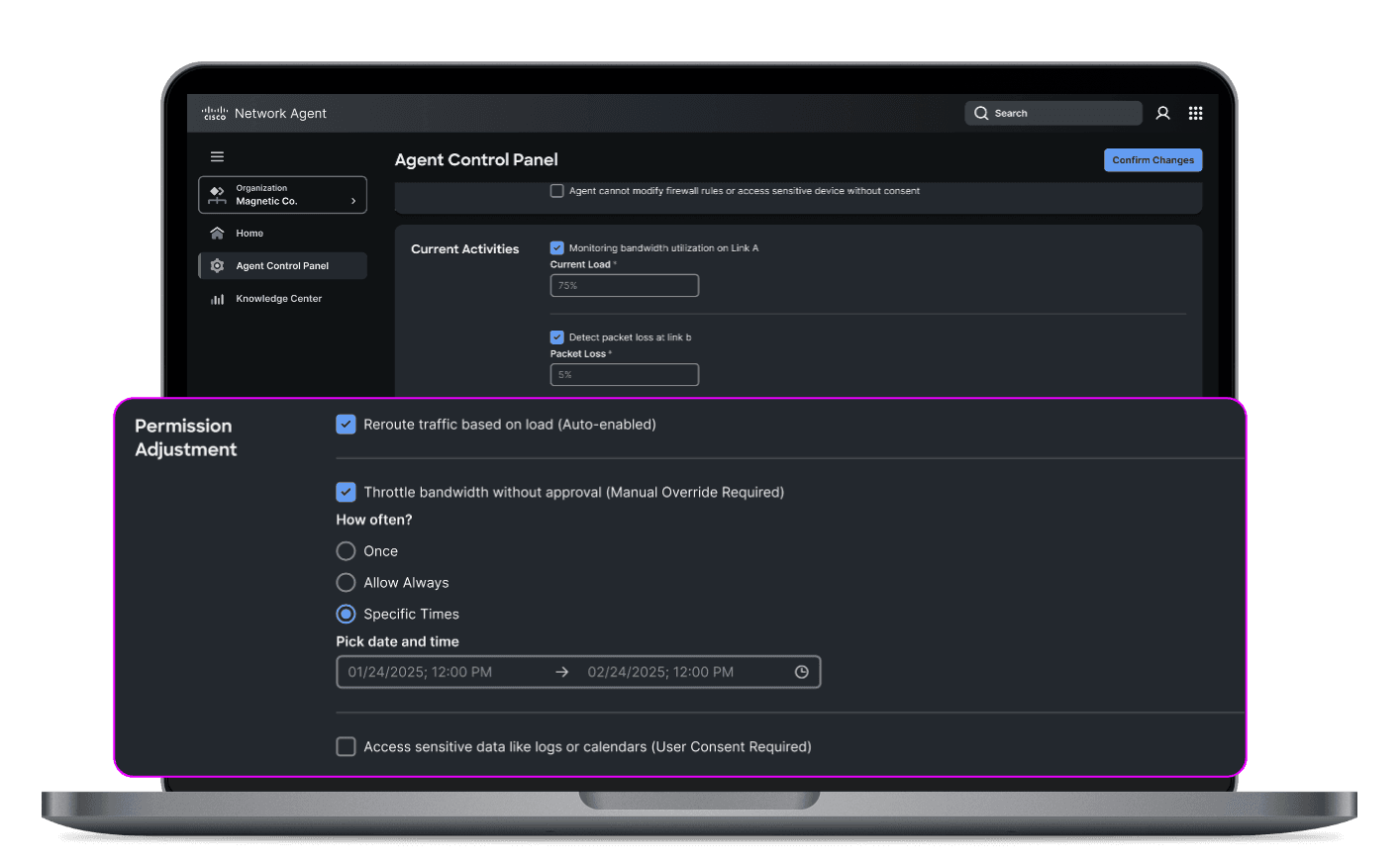
Empowering Users with Control
Establishing clear boundaries for AI Agents to ensure they operate within a well-defined scope.
Designing Tomorrow's Human-Agent Collaboration At Outshift
These principles are the foundation for building effective partnerships between humans and AI at Outshift.
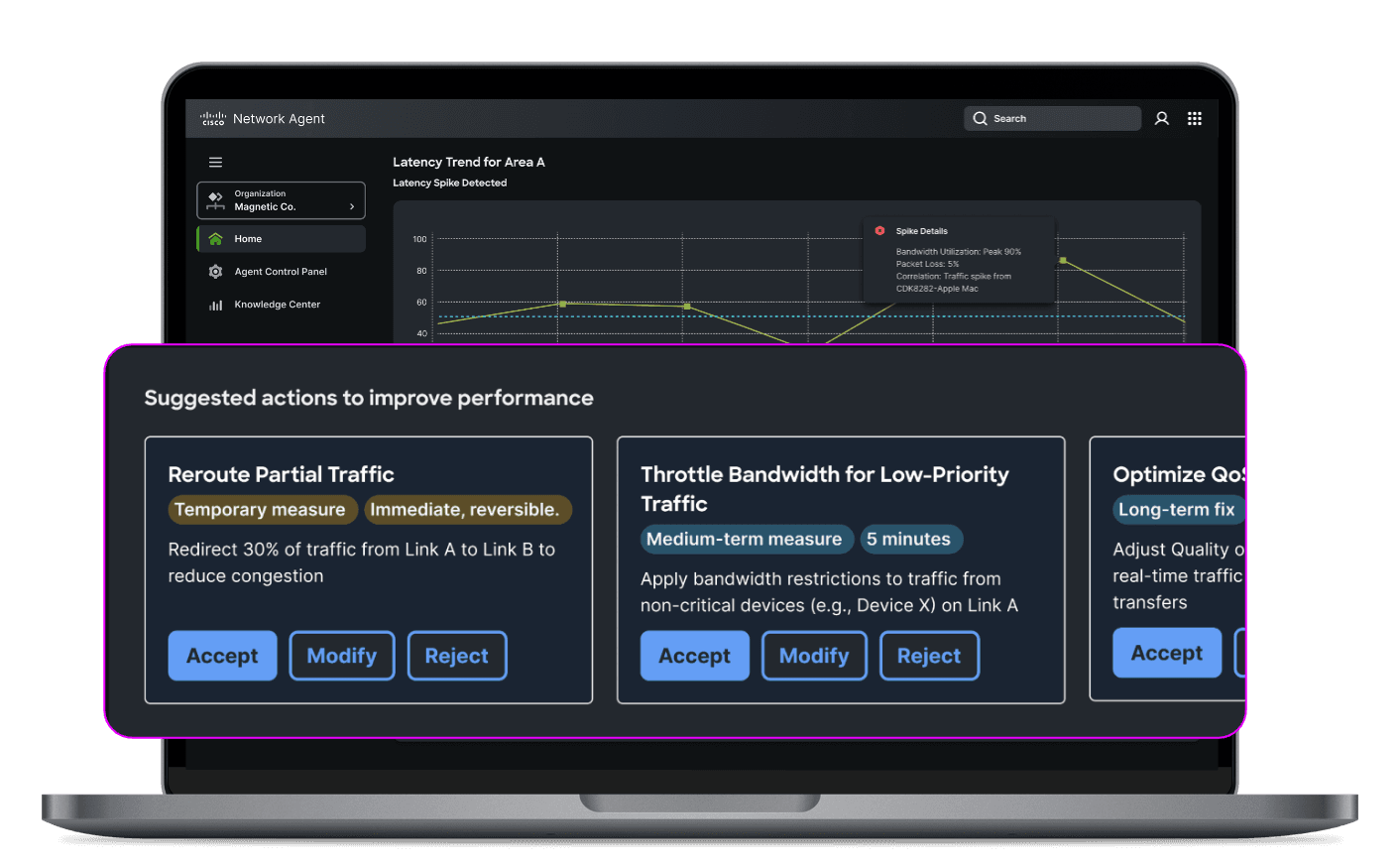
Building Confidence Through Clarity
Surface AI reasoning, displaying: Confidence Levels, realistic expectations, and the extent of changes to enable informed decision-making.
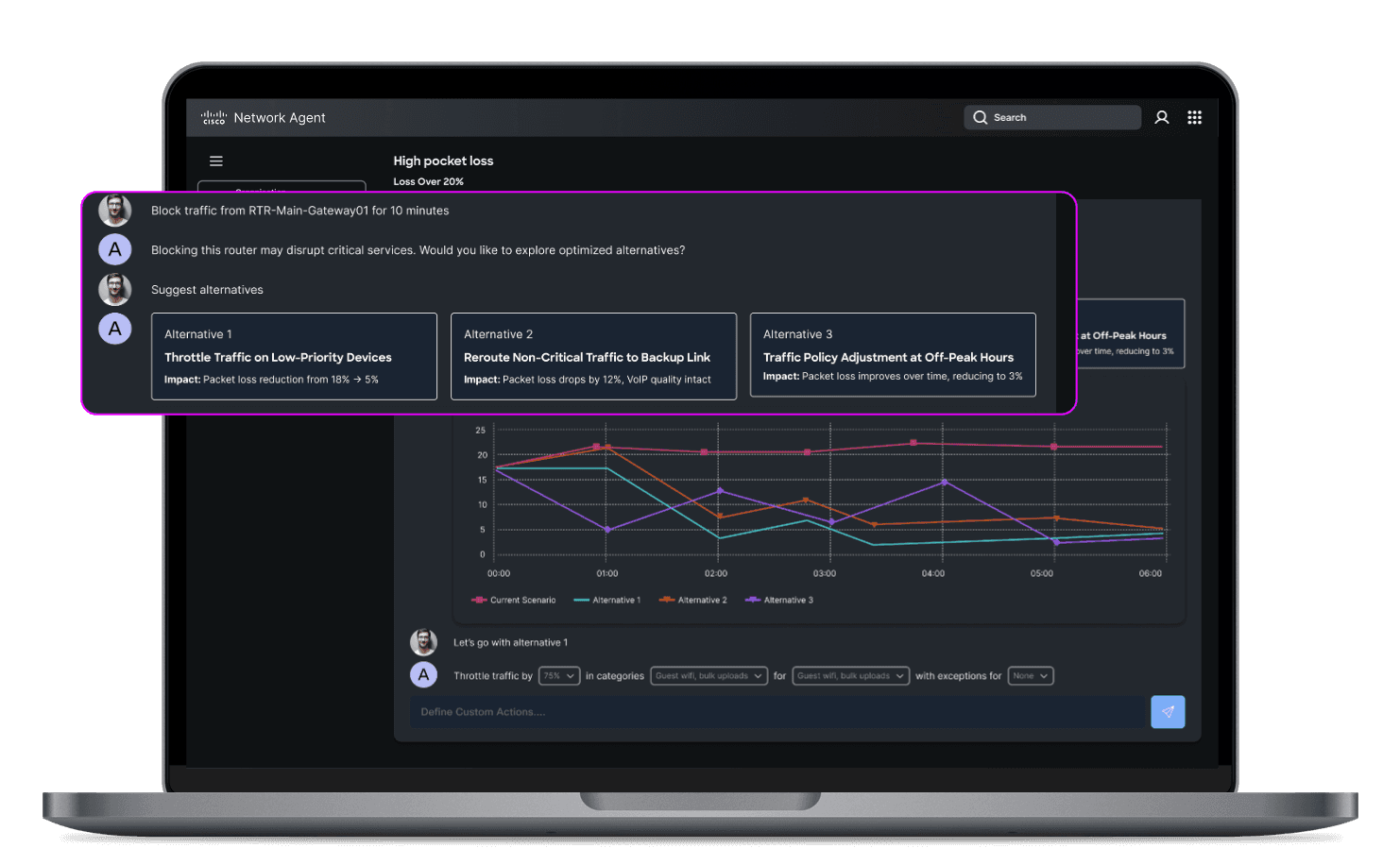
Always Try To Amplify Human Potential
Actively collaborate through simulations and come to an effective outcome together.
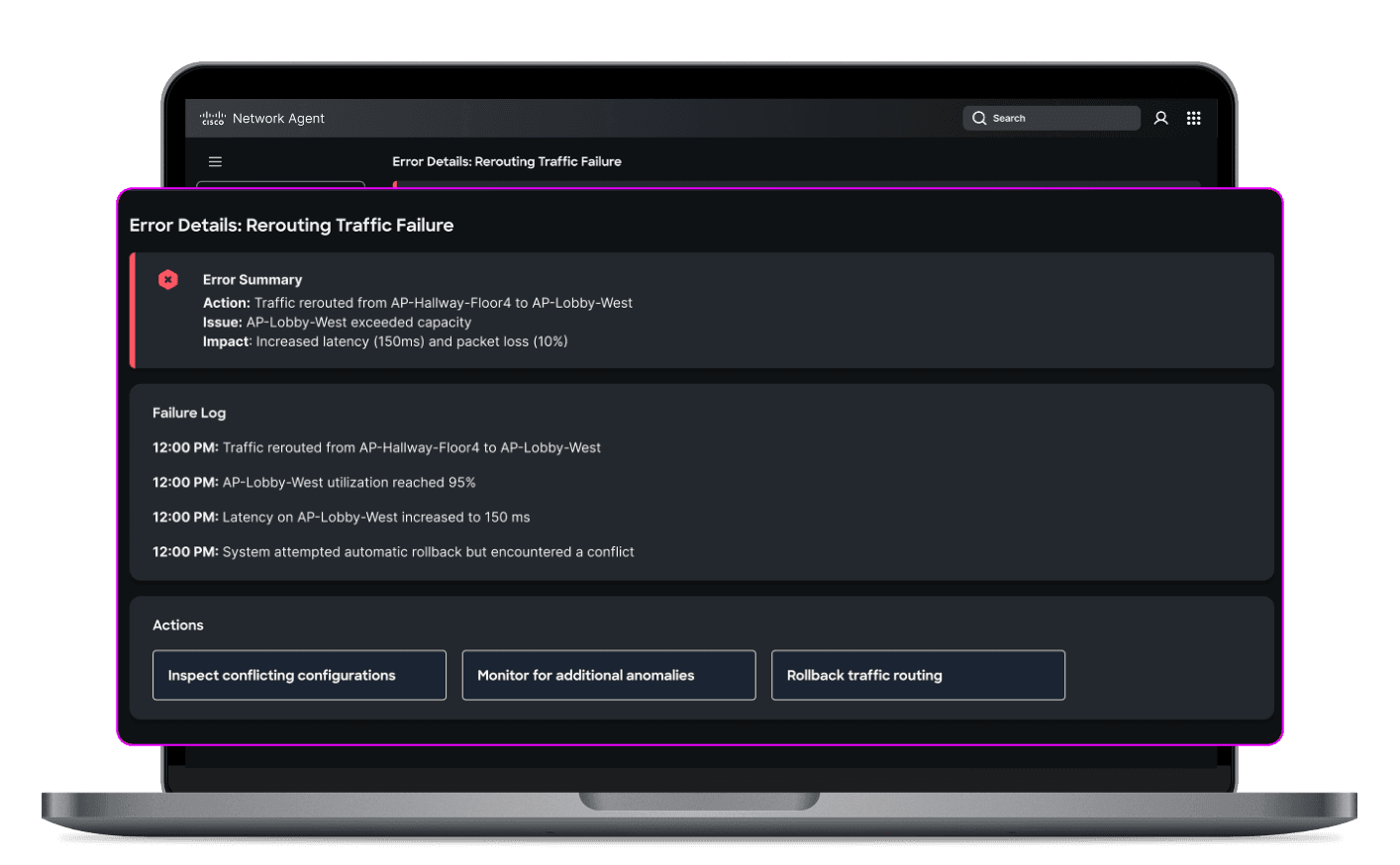
Let Users Stay In Control When It Matters
Easy access to detailed logs and performance metrics for every agent action, enabling the review of decisions, workflows, and ensure compliance. Include clear recovery steps for seamless continuity.
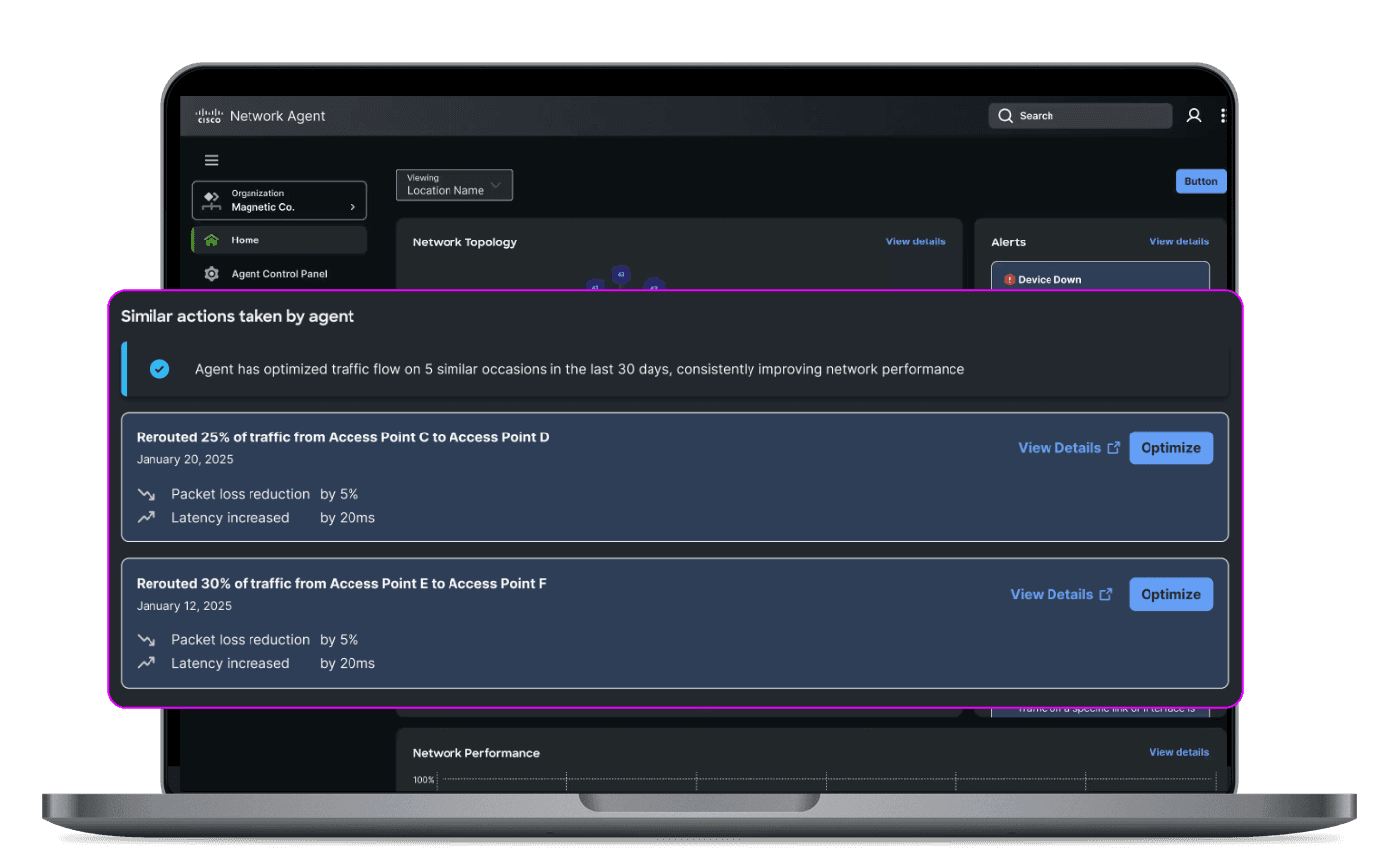
Take It One Interaction at a Time
See agent actions in context and observe agent performance in network improvement.
Addressing the Challenges: Gaps in Human-Agent Collaboration
All this autonomous help is great, sure – but it's not without its challenges.
Autonomous agents have fundamental gaps that we need to address to ensure successful collaboration:
Addressing the Challenges: Gaps in Human-Agent Collaboration
All this autonomous help is great, sure – but it's not without its challenges.
Autonomous agents have fundamental gaps that we need to address to ensure successful collaboration:
The Solution:
Five Design Principles for Human-Agent Collaboration
What to Consider:
Five Design Principles for Human-Agent Collaboration
Put Humans in the Driver's Seat
Users should always have the final say, with clear boundaries and intuitive controls to adjust agent behavior. An example of this is Google Photos' Memories feature which allows users to customize their slideshows and turn the feature off completely.
Make the Invisible Visible
The AI's reasoning and decision-making processes should be transparent and easy to understand, with confidence levels or uncertainty displayed to set realistic expectations. North Face's AI shopping assistant exemplifies this by guiding users through a conversational process and providing clear recommendations.
Ensure Accountability
Ensure Accountability
Anticipate edge cases to provide clear recovery steps, while empowering users to verify and adjust AI outcomes when needed. ServiceNow's Now Assist AI is designed to allow customer support staff to easily verify and adjust AI-generated insights and recommendations.
Collaborate, Don't Just Automate
Prioritize workflows that integrate human and AI capabilities, designing intuitive handoffs to ensure smooth collaboration. Aisera HR Agents demonstrate this by assisting with employee inquiries while escalating complex issues to human HR professionals.
Earn Trust Through Consistency:
Build trust gradually with reliable results in low-risk use cases, making reasoning and actions transparent. ServiceNow's Case Summarization tool is an example of using AI in a low-risk scenario to gradually build user trust in the system's capabilities.
Designing Tomorrow's Human-Agent Collaboration At Outshift
These principles are the foundation for building effective partnerships between humans and AI at Outshift.
Empowering Users with Control
Establishing clear boundaries for AI Agents to ensure they operate within a well-defined scope.
Building Confidence Through Clarity
Surface AI reasoning, displaying:
Confidence levels
Realistic Expectations
Extent of changes to enable informed decision-making
Addressing the Challenges: Gaps in Human-Agent Collaboration
All this autonomous help is great, sure – but it's not without its challenges.
Autonomous agents have fundamental gaps that we need to address to ensure successful collaboration:
The Solution:
Five Design Principles for Human-Agent Collaboration
What to Consider:
Five Design Principles for Human-Agent Collaboration
Put Humans in the Driver's Seat
Users should always have the final say, with clear boundaries and intuitive controls to adjust agent behavior. An example of this is Google Photos' Memories feature which allows users to customize their slideshows and turn the feature off completely.
Make the Invisible Visible
The AI's reasoning and decision-making processes should be transparent and easy to understand, with confidence levels or uncertainty displayed to set realistic expectations. North Face's AI shopping assistant exemplifies this by guiding users through a conversational process and providing clear recommendations.
Ensure Accountability
Ensure Accountability
Anticipate edge cases to provide clear recovery steps, while empowering users to verify and adjust AI outcomes when needed. ServiceNow's Now Assist AI is designed to allow customer support staff to easily verify and adjust AI-generated insights and recommendations.
Collaborate, Don't Just Automate
Prioritize workflows that integrate human and AI capabilities, designing intuitive handoffs to ensure smooth collaboration. Aisera HR Agents demonstrate this by assisting with employee inquiries while escalating complex issues to human HR professionals.
Earn Trust Through Consistency:
Build trust gradually with reliable results in low-risk use cases, making reasoning and actions transparent. ServiceNow's Case Summarization tool is an example of using AI in a low-risk scenario to gradually build user trust in the system's capabilities.
Always Try To Amplify Human Potential
Actively collaborate through simulations and come to an effective outcome together.
Let Users Stay In Control When It Matters
Easy access to detailed logs and performance metrics for every agent action, enabling the review of decisions, workflows, and ensure compliance. Include clear recovery steps for seamless continuity.
Designing Tomorrow's Human-Agent Collaboration At Outshift
These principles are the foundation for building effective partnerships between humans and AI at Outshift.
Take It One Interaction At A Time
See agent actions in context and observe agent performance in network improvement.
As we refine our design principles and push the boundaries of innovation, integrating advanced AI capabilities comes with a critical responsibility. For AI to become a trusted collaborator—rather than just a tool—we must design with transparency, clear guardrails, and a focus on building trust. Ensuring AI agents operate with accountability and adaptability will be key to fostering effective human-agent collaboration. By designing with intention, we can shape a future where AI not only enhances workflows and decision-making but also empowers human potential in ways that are ethical, reliable, and transformative.
Because in the end, the success of AI won’t be measured by its autonomy alone—but by how well it works with us to create something greater than either humans or machines could achieve alone.
Designing Tomorrow's Human-Agent Collaboration At Outshift
These principles are the foundation for building effective partnerships between humans and AI at Outshift.
Content
Some More

Projects
·
7 min
Designing Human-Machine Interactions in an Autonomous Agent World
Projects
·
7 min
Designing Human-Machine Interactions in an Autonomous Agent World
Projects
·
4 min
AI Lens - Revolutionizing User Interaction with Contextual AI
Projects
·
4 min
AI Lens - Revolutionizing User Interaction with Contextual AI
Thoughts
·
3 min
Mapping User Journeys for Emerging Technology
Thoughts
·
3 min